Posts

Showing posts with the label AT solution

Hands-on Use of Assistive Technology Learning in the Classroom

Image
By: Kimberly Chouinard, ECSEAT Scholar Over the past few years I have taken a few courses in Assistive Technology though my program here at the University of New Hampshire. I have learned to “use what you have” for support or to make things accessible for learners. This semester I had a great experience with a student in my class that I would like to share. A student in my class who experiences motor delays started to grow.  That’s great!  We love growth!  But, this growth caused seating issues and it takes time to fit, order and receive new equipment. He seemed to be growing out of his supportive chair and tray. His legs had grown and his feet where not well positioned on the foot support any longer. This growth caused his feet to slide off the foot support, kick out and limit accessibility to table activities with peers. I took my concerns to our team. His nurse, Physical Therapist and I were able to identify the problem (i.e., the foot plate was now too short for his g...

Hands-on Exploration: Building Supply and Department Stores

Image
By: Maria Mazzola, EC-SEAT Scholar Experience: During my field experiences exploring Assistive Technology, I visited local stores to find devices that can help individuals with disabilities with daily tasks at home. I decided to explore Home Depot and Best Buy. Information about each device is pictured and described below. 1. The first device I explored was the Motion Activated Light Bulb (FEIT Electric Intellibulb). I found this device at Home Depot in the “lights” section. This device costs $8.99 (60 W). This device is used to light up an area in your house or anywhere that can support electricity. It lights up instantly when activated by motion (such as walking by or just waving your hand. This device can accommodate those who cannot physically turn on a light by themselves. The light turns on when it detects motion (up to 19ft away) and turns off automatically when there is no motion in the room of the light for 10 minutes. This device is great because it is hands-free and doe...

Assistive Technology Devices you Can Create to Use in Your Classroom

Image
By: Maria Mazzola, EC-SEAT Scholar What is Assistive Technology? Devices and services that help individuals with special needs. They help people with disabilities: remember, read, see, communicate, and listen. iPad/iPhone Stands iPad/iPhone stands are a great assistive technology to use in the classroom and at home. These stands help children or individuals keep their device in place without having to hold it up. This assistive technology can be helpful especially to children or individuals with physical disabilities such as Cerebral Palsy or Muscle Dystrophy. Materials: coro-claw, exacto knife, sharpie corrugated plastic, double sided foam tape scissors, ruler. Sandwich holder A sandwich holder is a great assistive technology device to use with children and individuals with disabilities. This device allows an individual to eat a sandwich without having to use their hands. This device can be mounted onto a wheelchair as well. Materials: corrugated plastic, Coro-claw, loc-line, double-...

Creating Simple Low-Tech AT Devices at Home

Image
By: Holly Bogardus , EC-SEAT Scholar Once we realize the possibilities of the materials around us, it becomes easier to envision ourselves creating useful tools for those we work with. Assistive devices do not need to be bought, or cost hundreds of dollars. Below you will find a few simple and cheap devices that address an assortment of needs. While looking at these devices I encourage you to consider a problem you or another has or is experiencing, and if there could be a simple solution at hand. Looking at materials in new ways can open many possibilities of utilizing things creatively to increase a person's ability to perform a task, or to be better focused and engaged in an activity. Simple solutions are out there if we can think creatively as well as critically. Visual Complexity Reduction Device Materials: Magnets (2) Tools: None This is a tool for visual complexity reduction using 2 magnets. I chose a colorful frame to help focus the attention, and the black strip ...

Assistive Devices all Around Us: Being Thoughtful of the Possibilities

Image
By: Holly Bogardus , EC-SEAT Scholar At first the concept of “Assistive Technology (AT) Devices” can be intimidating to those who are unfamiliar with the concept or tools. It can help to think of these devices simply as anything that can help a person to do or complete a task, or increase their ability to engage in a task. These do not necessarily need to be expensive, complicated, or individually designed devices. Assistive devices are in fact all around us and easily accessible. By acknowledging their presence and many uses in our lives, we can more comfortably engage in conversations regarding necessary devices or tools that can benefit students, family, and friends and increase their success and independence in multiple settings. Here you will find just a small sample of objects that can be found both in typical settings as well as in various types of stores that can be beneficial assistive devices meetings a range of needs. After reading this post I would encourage you to lo...

Low Tech AT with Corrugated Plastic: Alternative Mouse Pad

Image
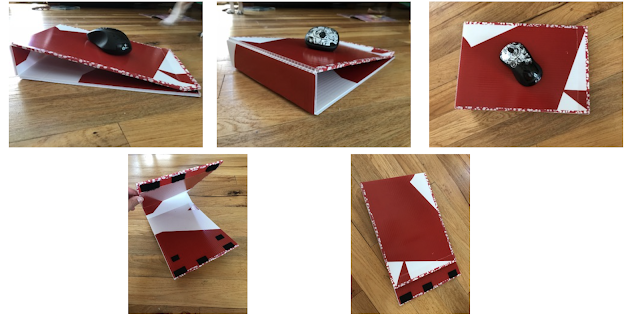
By: Katelyn Baron , EC-SEAT Scholar The solution I created is for an individual who experiences muscle strain in their forearm. They currently use a computer during their school day and at home for math/literacy enrichment. The regular mousepad was making their wrist turn towards the left and the position was uncomfortable and unnatural. This was causing more pain, than normal, in their forearm and in their wrist. I decided to make an ergonomic mouse pad to hopefully alleviate the strain and pain in the muscles in their forearm and wrist. Materials and Tools Utility blade Coro Claw Ruler Corrugated plastic Velcro hook and loop Washi tape Grip Adhesive Non-Slip Pads The pictures below show the mousepad is on an incline with the high side being 2 inches from the surface it is placed on. This incline allows for the wrist to be in a neutral position. The mousepad is also able to lie flat with the use of Velcro. The mousepad can easily fit into a their school bag withou...