Posts

Showing posts with the label Guided Access

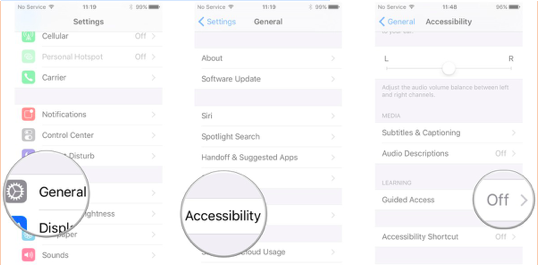
How do I limit my iPad to one app? Use Guided Access!
Image
By: Kelly Hopkins , EC-SEAT Scholar Whether you're working with a child and would like them to focus on one app, or you only want your student to be able to use a section of the screen you can use Apple's Guided Access feature to lock your screen on one specific app. Built as an Accessibility feature, Guided Access limits users to one specific app, preventing them from switching to another program or returning to the Home screen. This can be extremely useful in a number of settings, including education. Whether it's a writing app, drawing app, music app, math app, a story, video, or reading app; Guided Access helps make sure that all attention remains on that app. It also prevents you from accidentally exiting to the Home screen or another app when you don't mean to. Guided Access can even be used to create a "guest mode," allowing you to hand your device to someone so that they can use Safari, iBooks, Video, or a game without having to worry that they'll...

How to Utilize Guided Access When Using an App on iPad

Image
By: Laura Kazmierczak (EC-SEAT Scholar) and Carrie Portrie (EC-SEAT Project Coordinator) When working with individuals and children on an iPad using various apps for learning opportunities or leisure, there may be some parts of the screen that you would like to restrict access to.   This may be for many reasons, but some common reasons from a parents perspective are: You don't want a child to accidentally click on the part of the screen that offers an option to purchase the app.  You don't want them taking pictures, modifying settings, or entering the information page of the app. Educators, clinicians, and professionals can also share in those same reasons, but they may also want to: Use the app as a reward for completing a task and guided access allows them to set a time limit in the app which will restrict total access when the time is up and they are to return to their tasks. Restrict access to parts of the screen for someone with low muscle tone in their ar...

Using iPads to Support Children with Disabilities - Mother Goose App and Ollie

By:  Sophia Fowler , EC-SEAT scholar, early childhood special educator, and parent.  Sophia is a dedicated early supports and services professional as well as a mother. For her final project, during the J-Term course Using iPads to Support Children with Disabilities , she worked with her son. She utilized Guided Access on the iPad so he could use the Mother Goose App with little interference from pop ups and ads. Watch Ollie navigate the app.   Final Project for Using iPads to Support Children with Disabilities - Mother Goose App and Ollie from ec seat on Vimeo .